
Buying Salesforce is the easy part. Making it actually fit your business — that's where the real work begins, and it's the step a surprising number of companies skip or rush. The result? Sales reps keep their own spreadsheets on the side, support agents toggle between four different tabs to find a customer's history, and leadership ends up guessing instead of knowing.
This walkthrough covers what Salesforce implementation involves, why 2026 raises the stakes on doing it properly, and the path that takes a business from "we have Salesforce" to "Salesforce runs how we run."
So, What Is Salesforce Implementation?
Strip away the jargon, and Salesforce implementation is simply the process of configuring the platform so it mirrors how your business actually functions, rather than forcing your business to adapt to a generic default.
That covers things like:
- Recreating your real sales, service, and marketing processes inside the platform
- Bringing over your existing customer and operational data
- Building custom fields, objects, and automated workflows tailored to your needs
- Linking Salesforce up with the rest of your tech stack
- Getting your team comfortable enough to actually use it day to day
The short version: implementation is everything standing between "we purchased a license" and "our business runs on this system."
Why This Matters More Than It Used To
Salesforce keeps getting smarter — more automation baked in, more AI-powered features, deeper connections to other tools. That's an opportunity, but it's also a multiplier on risk. If the underlying implementation is shaky, none of those advanced capabilities perform the way they're supposed to.
Weak implementations tend to show the same symptoms: workarounds piling up, decisions made on incomplete data, automation that was promised but never configured. A solid implementation, on the other hand, gives every future feature — AI insights included — something stable to build on.
Different Goals Need Different Implementations
There's no universal template, because "implementation" looks different depending on what part of your business you're solving for:
- Sales Cloud implementations are built around pipeline visibility — managing leads, tracking interactions, and forecasting revenue accurately.
- Service Cloud implementations pull every customer interaction into one workspace, so agents aren't hunting across systems mid-conversation.
- Marketing Cloud implementations are configured for coordinated, data-driven campaigns spanning email, social, mobile, and web.
- Commerce Cloud implementations connect buying experiences across digital and physical channels into one coherent system.
Most businesses don't tackle all four at once — starting with whichever cloud solves the most pressing problem, then expanding later, is the norm rather than the exception.
The Implementation Journey, Stage by Stage
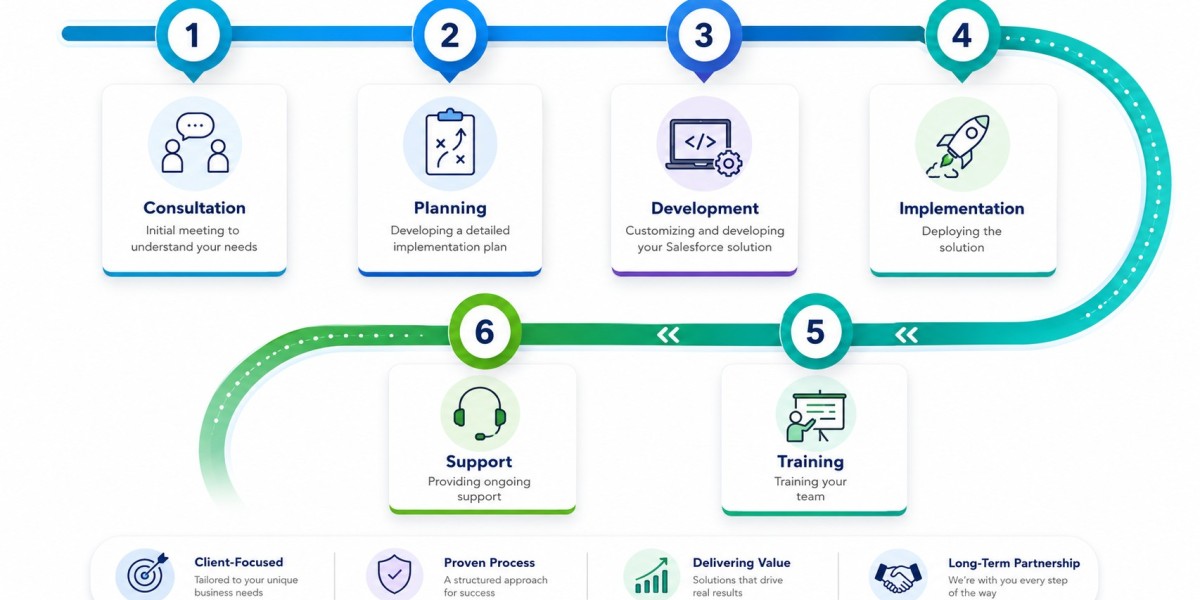
Despite every project having its own quirks, most implementations follow a familiar six-stage arc:
Stage 1 — Consultation The starting point: understanding your business, your goals, and exactly where current processes are breaking down. Whatever happens later is shaped by what gets uncovered here.
Stage 2 — Planning Discovery turns into a concrete plan — scope, timeline, data needs, and the specific build work ahead.
Stage 3 — Development The platform gets built: fields, objects, workflows, automations, and integrations, all configured against the agreed plan.
Stage 4 — Implementation / Go-Live The system goes live. Data migrates over, configurations get tested, and the business officially starts operating inside the new environment.
Stage 5 — Training Often underestimated, but this is where adoption is won or lost — your team needs real, hands-on training, not just a walkthrough video.
Stage 6 — Ongoing Support The relationship doesn't end at launch. Continued support means problems get caught early and the system keeps adapting as your business changes.
If an implementation goes wrong, it's almost always because planning or training got compressed in the name of speed — and the consequences show up months later as low adoption.
What Reliably Separates Good Implementations From Bad Ones
A handful of patterns show up again and again in implementations that succeed:
- Real customization, not a template — a one-size-fits-all setup will always leave gaps; the platform should be designed around your actual objectives.
- A consistent, proven methodology — repeatable processes reduce risk and keep a project on track from kickoff through launch.
- Genuinely certified expertise — implementation involves consequential technical decisions, and experience here prevents expensive errors.
- Support that doesn't stop at launch — ongoing refinement after go-live is often where the real value gets unlocked.
- A focus on outcomes, not just activity — better visibility, stronger adoption, and measurable ROI are the actual markers of success.
Mistakes That Quietly Undermine Implementations
- Treating go-live as the finish line instead of the starting point of an evolving system
- Cutting training short and hoping the platform is "intuitive enough"
- Skipping proper planning to hit a deadline, then rebuilding pieces later anyway
- Under-customizing the platform and letting teams compensate with manual workarounds
Frequently Asked Questions
In plain terms, what is Salesforce implementation? It's the process of configuring Salesforce to match how your business genuinely works — not simply turning the software on.
How long does an implementation usually take? It depends on scope. A lean, single-cloud setup for a smaller business might wrap up in a few weeks; a complex, multi-cloud enterprise rollout can run several months.
What drives the cost of implementation? Cost scales with the number of clouds involved, the depth of customization, how complex the data migration is, and how many integrations are needed. A consultation is the fastest way to get a real estimate.
Can implementation be handled in-house, without a partner? It's possible, but businesses without a dedicated Salesforce admin typically find that an experienced partner reduces risk and avoids expensive rework down the line.
What's the actual difference between implementation and customization? Implementation is the full end-to-end process of setting Salesforce up and deploying it. Customization is just one component — shaping fields, objects, and workflows to fit your needs.
Is this only something large enterprises need to worry about? No — it scales both ways. Many small businesses start with a focused, single-cloud implementation and grow it over time.
What should happen once implementation wraps up? Go-live is the beginning, not the end. Ongoing support, refresher training, and periodic tuning are what keep the system delivering value as the business evolves.
Wrapping Up
Salesforce implementation isn't a box to check — it's what determines whether your team genuinely adopts the platform or quietly reverts to spreadsheets within a year. Approaching it as a real process — consultation, planning, building, launch, training, and continued support — is what makes the difference between the two outcomes.
If you're considering a Salesforce implementation and want something built around your business rather than handed to you off the shelf, CRM Frontier's certified team can talk through what that looks like for your situation. Book a free consultation to get the conversation started.